작업 개요
이 포스팅에서는 Rocky Linux에서 LVM(Logical Volume Manager)을 사용하여 디스크를 파티션하고, 논리 볼륨을 생성한 후 마운트하는 전체 과정을 다룹니다.
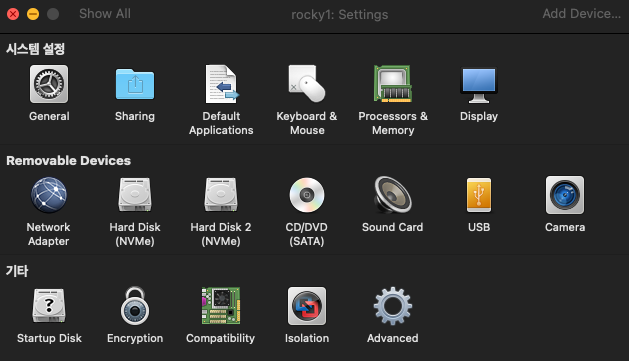
필자는 맥북을 사용하고 있으며, VMware에 Rocky 9.7 version을 사용중입니다. 가장 먼저 하드디스크를 추가하실때 settings을 누르시고 (현 가상환경을 반드시 sudo poweroff로 꺼주셔야 합니다.) 아래 그림 보시면, 상단에 Add Device에서 뉴 하드디스크를 1기가 짜리 두번을 생성합니다. 맥북에서는 하드디스크 생성시 /dev/nvme0n... 확장명으로 만들어집니다.
최종 목표:
- 2개의 디스크(nvme0n2, nvme0n3)를 LVM으로 구성
- "cert"라는 볼륨 그룹 생성
- "security"(500MB, ext3)와 "monitor"(나머지 전체, ext4) 논리 볼륨 생성
- 각각 /mp3, /mp4에 마운트
1단계: 디스크 파티션 생성 (nvme0n2)
첫 번째 디스크에 파티션을 생성합니다.
sudo fdisk /dev/nvme0n2
fdisk 명령어 순서:
- n - 새 파티션 생성
- p - primary 파티션 선택
- 1 - 파티션 번호 1
- Enter - 기본 First sector 사용
- Enter - 기본 Last sector 사용 (전체 공간 사용)
- t - 파티션 타입 변경
- 8e - Linux LVM 타입으로 변경
- w - 변경사항 저장 및 종료
실행 결과:
Welcome to fdisk (util-linux 2.37.4).
Changes will remain in memory only, until you decide to write them.
Be careful before using the write command.

Device does not contain a recognized partition table.
Created a new DOS disklabel with disk identifier 0x12345678.

Command (m for help): n
Partition type
   p   primary (0 primary, 0 extended, 4 free)
   e   extended (container for logical partitions)
Select (default p): p
Partition number (1-4, default 1): 1
First sector (2048-2097151, default 2048):
Last sector, +/-sectors or +/-size{K,M,G,T,P} (2048-2097151, default 2097151):

Created a new partition 1 of type 'Linux' and of size 1023 MiB.

Command (m for help): t
Selected partition 1
Hex code or alias (type L to list all): 8e
Changed type of partition 'Linux' to 'Linux LVM'.

Command (m for help): w
The partition table has been altered.
Calling ioctl() to re-read partition table.
Syncing disks.
2단계: 디스크 파티션 생성 (nvme0n3)
두 번째 디스크도 동일한 방법으로 파티션을 생성합니다.
sudo fdisk /dev/nvme0n3
실행 결과:
Welcome to fdisk (util-linux 2.37.4).
Changes will remain in memory only, until you decide to write them.
Be careful before using the write command.

Device does not contain a recognized partition table.
Created a new DOS disklabel with disk identifier 0xb329155e.

Command (m for help): n
Partition type
   p   primary (0 primary, 0 extended, 4 free)
   e   extended (container for logical partitions)
Select (default p): p
Partition number (1-4, default 1): 1
First sector (2048-2097151, default 2048):
Last sector, +/-sectors or +/-size{K,M,G,T,P} (2048-2097151, default 2097151):

Created a new partition 1 of type 'Linux' and of size 1023 MiB.

Command (m for help): t
Selected partition 1
Hex code or alias (type L to list all): 8e
Changed type of partition 'Linux' to 'Linux LVM'.

Command (m for help): w
The partition table has been altered.
Calling ioctl() to re-read partition table.
Syncing disks.
3단계: 파티션 확인
생성된 파티션을 확인합니다.
lsblk
실행 결과:
NAME        MAJ:MIN RM  SIZE RO TYPE MOUNTPOINTS
sr0          11:0    1 10.5G  0 rom  /run/media/admin/Rocky-9-7-aarch64-dvd
nvme0n1     259:0    0   20G  0 disk
├─nvme0n1p1 259:1    0  600M  0 part /boot/efi
├─nvme0n1p2 259:2    0    1G  0 part /boot
└─nvme0n1p3 259:3    0 18.4G  0 part
  ├─rl-root 253:0    0 16.4G  0 lvm  /
  └─rl-swap 253:1    0    2G  0 lvm  [SWAP]
nvme0n2     259:4    0    1G  0 disk
└─nvme0n2p1 259:5    0 1023M  0 part
nvme0n3     259:6    0    1G  0 disk
└─nvme0n3p1 259:7    0 1023M  0 part
nvme0n2p1과 nvme0n3p1이 정상적으로 생성된 것을 확인할 수 있습니다.
4단계: Physical Volume (PV) 생성
LVM의 첫 단계로 물리 볼륨을 생성합니다.
sudo pvcreate /dev/nvme0n2p1 /dev/nvme0n3p1
실행 결과:
Physical volume "/dev/nvme0n2p1" successfully created.
Physical volume "/dev/nvme0n3p1" successfully created.
PV 확인:
sudo pvs
PV             VG Fmt  Attr PSize    PFree
/dev/nvme0n1p3 rl lvm2 a--    18.41g       0
/dev/nvme0n2p1    lvm2 ---  1023.00m 1023.00m
/dev/nvme0n3p1    lvm2 ---  1023.00m 1023.00m
5단계: Volume Group (VG) 생성
물리 볼륨들을 하나의 볼륨 그룹으로 묶습니다.
sudo vgcreate cert /dev/nvme0n2p1 /dev/nvme0n3p1
실행 결과:
Volume group "cert" successfully created
VG 확인:
sudo vgs
VG   #PV #LV #SN Attr   VSize  VFree
cert   2   0   0 wz--n-  1.99g 1.99g
rl     1   2   0 wz--n- 18.41g    0
cert 볼륨 그룹이 생성되었고, 총 1.99GB의 공간을 사용할 수 있습니다.
6단계: Logical Volume (LV) 생성
볼륨 그룹 위에 논리 볼륨을 생성합니다.
security 볼륨 생성 (500MB):
sudo lvcreate -L 500M -n security cert
Logical volume "security" created.
monitor 볼륨 생성 (남은 공간 전체):
sudo lvcreate -l 100%FREE -n monitor cert
Logical volume "monitor" created.
LV 확인:
sudo lvs
LV       VG   Attr       LSize   Pool Origin Data%  Meta%  Move Log Cpy%Sync Convert
monitor  cert -wi-a-----   1.50g
security cert -wi-a----- 500.00m
root     rl   -wi-ao----  16.41g
swap     rl   -wi-ao----   2.00g
7단계: 파일시스템 생성
각 논리 볼륨에 파일시스템을 생성합니다.
security 볼륨 - ext3 포맷:
sudo mkfs.ext3 /dev/cert/security
mke2fs 1.46.5 (30-Dec-2021)
Creating filesystem with 512000 1k blocks and 128016 inodes
Filesystem UUID: 338de4df-86c9-4835-b1ef-c82c2fe02b97
Superblock backups stored on blocks:
	8193, 24577, 40961, 57345, 73729, 204801, 221185, 401409

Allocating group tables: done
Writing inode tables: done
Creating journal (8192 blocks): done
Writing superblocks and filesystem accounting information: done
monitor 볼륨 - ext4 포맷:
sudo mkfs.ext4 /dev/cert/monitor
mke2fs 1.46.5 (30-Dec-2021)
Creating filesystem with 394240 4k blocks and 98592 inodes
Filesystem UUID: 793498b4-6437-4ec2-b559-1933699916a6
Superblock backups stored on blocks:
	32768, 98304, 163840, 229376, 294912

Allocating group tables: done
Writing inode tables: done
Creating journal (8192 blocks): done
Writing superblocks and filesystem accounting information: done
8단계: 마운트 포인트 생성 및 마운트
디렉토리 생성:
sudo mkdir -p /mp3 /mp4
논리 볼륨 마운트:
sudo mount /dev/cert/security /mp3
sudo mount /dev/cert/monitor /mp4
마운트 확인:
df -h | grep /mp
/dev/mapper/cert-security  459M   47K  434M   1% /mp3
/dev/mapper/cert-monitor   1.5G   24K  1.4G   1% /mp4
9단계: 재부팅 후 자동 마운트 설정 (/etc/fstab)
재부팅 후에도 자동으로 마운트되도록 /etc/fstab 파일을 수정합니다.
fstab 파일 편집:
sudo vi /etc/fstab
fstab에 추가할 내용:
파일 맨 아래에 다음 두 줄을 추가합니다.(편집시 i누르고 밑에 줄 부터 추가하면 됩니다.)
/dev/cert/security    /mp3    ext3    defaults    0 0
/dev/cert/monitor     /mp4    ext4    defaults    0 0
저장하고 종료합니다. (vi 편집기에서 :wq 입력)
설정 테스트:
먼저 현재 마운트를 해제합니다.
sudo umount /mp3 /mp4
fstab 설정대로 마운트를 시도합니다.
sudo mount -a
마운트 확인:
df -h | grep /mp
실행 결과:
/dev/mapper/cert-security  459M   47K  434M   1% /mp3
/dev/mapper/cert-monitor   1.5G   24K  1.4G   1% /mp4
정상적으로 마운트되었다면 재부팅 후에도 자동으로 마운트됩니다!
정리
- 2개의 디스크 파티션 생성 (fdisk)
- Physical Volume 생성 (pvcreate)
- Volume Group "cert" 생성 (vgcreate)
- Logical Volume "security"(500MB)와 "monitor"(1.5GB) 생성 (lvcreate)
- ext3, ext4 파일시스템 포맷 (mkfs)
- /mp3, /mp4에 마운트
- /etc/fstab 설정으로 재부팅 후 자동 마운트 구성
LVM의 장점:
- 유연한 디스크 관리
- 동적 볼륨 크기 조정 가능
- 여러 디스크를 하나로 묶어 사용 가능
Tip: 시스템 재부팅 후 df -h | grep /mp 명령어로 자동 마운트가 정상적으로 되었는지 확인해보세요!
'리눅스' 카테고리의 다른 글
| [Linux] Linux 디스크 쿼터(Quota) 설정 실습 공부 기록 (0) | 2026.01.29 |
|---|---|
| [Linux] 디스크 쿼터 (0) | 2026.01.23 |
| [Linux: 수업3주차] 시스템 관리 (1) | 2026.01.22 |
| [Linux: Nginx] 웹 서버 설정 및 HTML 페이지 만들기 (0) | 2026.01.13 |
| [Linux:수업 2주차] Rocky Linux 네트워크 및 기본 명령어 정리 (0) | 2026.01.13 |